


677 Messages
•
44.6K Points
Account: Create a Subdomain

Here are instructions to create subdomains.
- Click Domains in the left navigation menu.
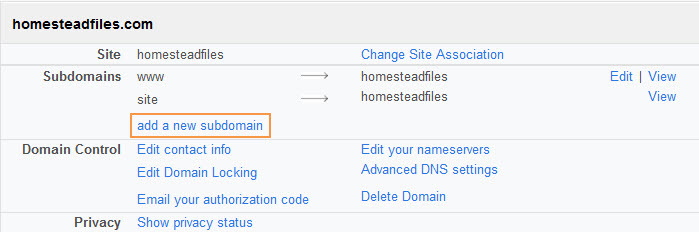
- Scroll down until you see your domain name. Then, click add a new subdomain.
- Enter the name of the subdomain you'd like.
- Link the subdomain to the appropriate location (Folder, Site, Storefront, or URL). Choose from the options listed.
- Click Save button to confirm your subdomain.
*Note: this is for domains on Sitebuilder sites only!
ben9683
26 Messages
•
604 Points
10 years ago
I would like to point the additional domains i have not to my main index, but to sub-domains I want to create under my main website name. How can I do this? Right now it appears as though I have to create a seperate site for each domain. - een trying to figure this out for ages but haven't a clue.
0
meirul4344
20 Messages
•
646 Points
8 years ago
Mine isn't giving me an option to create a new subdomain name does that mean I can't?
1
0
ben5411
70 Messages
•
1.6K Points
6 years ago
How do I create a subdomain on a pointed domain that is on homestead cloud, please?
TIA
3
0
douglas0989
5 Messages
•
140 Points
5 years ago
If I am creating a blog, should I set it up as a sub-domain of my primary domain?
1
0
neil7148
14 Messages
•
518 Points
4 years ago
My domain is a "pointed domain" and we want to create a subdomain. Is this possible through the Homestead Domain Center?
0
0